
schoolМатематика
verifiedРешено AI
Решение задания Word processing features (Упражнение C)
help_outlineУсловие задачи
Сделай все
lightbulbКраткий ответ
Представлено решение задания Word processing features (Упражнение C) по английскому языку. Ответы оформлены для удобства переписывания в тетрадь.
Подробное решение
Ниже представлены решения заданий с приложенных фотографий, оформленные для удобного переписывания в тетрадь.
Задание 1. Word processing features (Упражнение C)
1. The Standard toolbar lists the icons to save or print a document, spell check, etc. The Formatting Toolbar is the area for changing font, alignment, indentation, etc.
2. A font consists of three elements: typeface, type style and type size. For example, Palatino bold at 10 points.
3. Type style refers to a visual characteristic of a typeface, for example B for bold, I for italic and U for underlined.
4. If you need to change indentation — the space between the page margin and where the text aligns — you can click the Increase or Decrease Indent buttons.
5. The Header and Footer commands allow you to specify customized texts at the top and bottom of every page.
Задание 4. Артикли (Упражнение B)
Linux is (1) an operating system and it was initially created as (2) a hobby by a young student, Linus Torvalds, at the University of Helsinki in Finland. Version 1.0 of the Linux Kernel was released in 1994. (3) The Kernel, at the heart of all Linux systems, is developed and released under GNU General Public License, and its source code is freely available to everyone.
Apart from the fact that it's freely distributed, (4) — Linux's functionality, adaptability and robustness has made it the main alternative for proprietary Unix and Microsoft operating systems. IBM, Hewlett-Packard and other giants of the computing world have embraced Linux and support its ongoing development. More than (5) a decade after its initial release, Linux is being adopted worldwide, primarily as (6) a server platform. Its use as a home and office desktop operating system is also on the rise.
The operating system can also be incorporated directly into (7) — microchips in a process called (8) — embedding, and it is increasingly being used this way in appliances and devices.
Задание 5. Writing a summary (Краткое изложение текста о Linux)
Linux is a free, open-source operating system created by Linus Torvalds in 1994. Its core, the Kernel, is available to everyone under a public license. Due to its high adaptability and robustness, Linux has become a major alternative to Microsoft and Unix. Today, it is supported by large corporations and widely used as a server platform. Furthermore, its popularity is growing in the desktop market. Linux is also frequently embedded into microchips for various electronic appliances and smart devices.
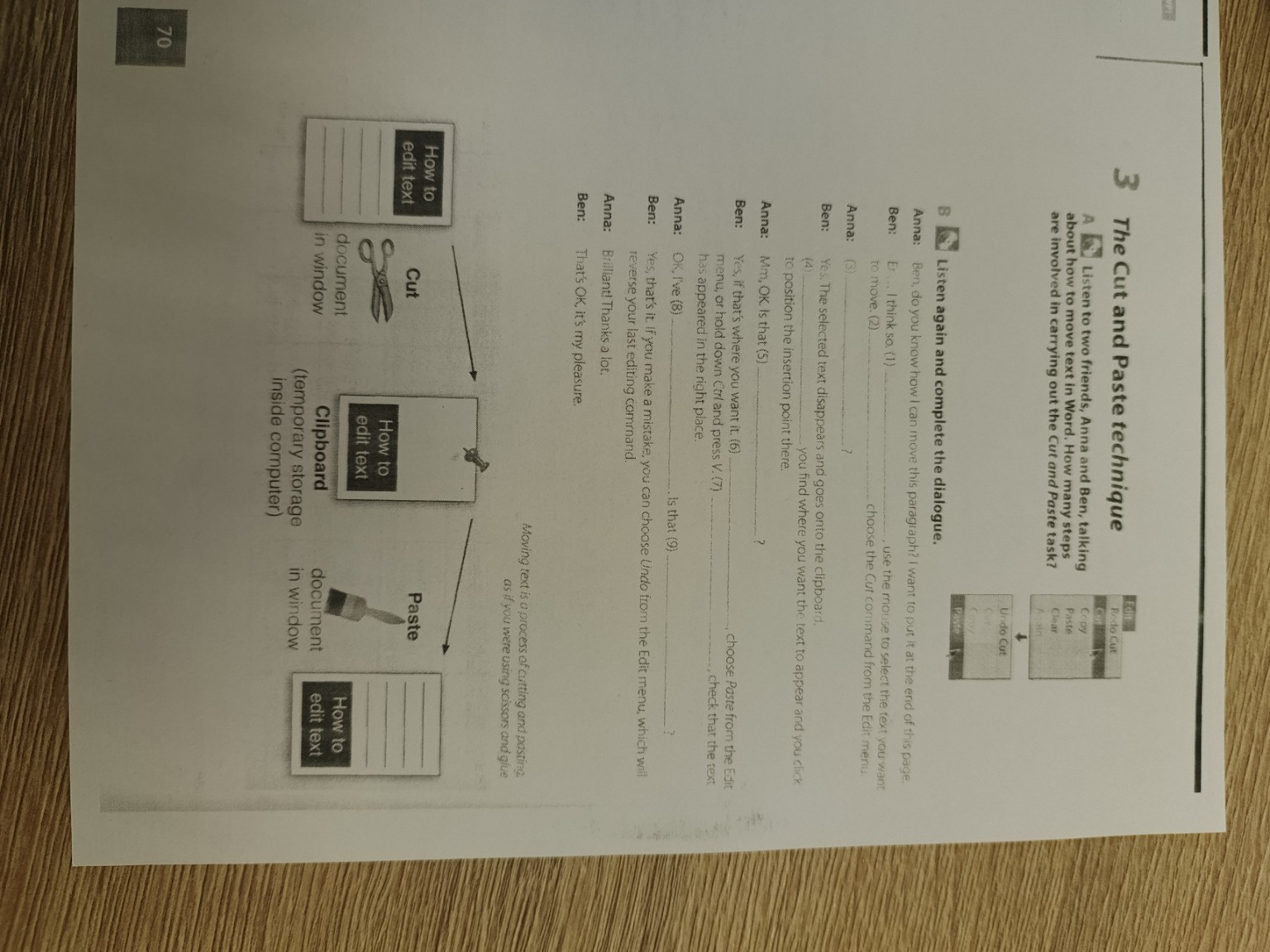
Задание 3. The Cut and Paste technique (Упражнение B)
Anna: Ben, do you know how I can move this paragraph? I want to put it at the end of this page.
Ben: Er... I think so. (1) First, use the mouse to select the text you want to move. (2) Then choose the Cut command from the Edit menu.
Anna: (3) Like this?
Ben: Yes. The selected text disappears and goes onto the clipboard. (4) Next, you find where you want the text to appear and you click to position the insertion point there.
Anna: Mm, OK. Is that (5) all?
Ben: Yes, if that's where you want it. (6) Finally, choose Paste from the Edit menu, or hold down Ctrl and press V. (7) Then check that the text has appeared in the right place.
Anna: OK, I've (8) done it. Is that (9) right?
Ben: Yes, that's it. If you make a mistake, you can choose Undo from the Edit menu, which will reverse your last editing command.
Anna: Brilliant! Thanks a lot.
Ben: That's OK, it's my pleasure.